
What Screenshots Should You Attach to a Casino Support Request?
When you contact casino support, the right screenshots can help the team understand what happened without asking you for the same details again.
When you contact casino support, the right screenshots can help the team understand what happened without asking you for the same details again. The goal is not to send everything you have. It is to attach the screenshots that clearly show the problem, the account action involved, and the timing of the issue.
If you are dealing with a larger unresolved support problem, this guide can also help you prepare better evidence before escalating through broader online casino complaints and payout issue steps.
Which screenshots help casino support understand your issue fastest?
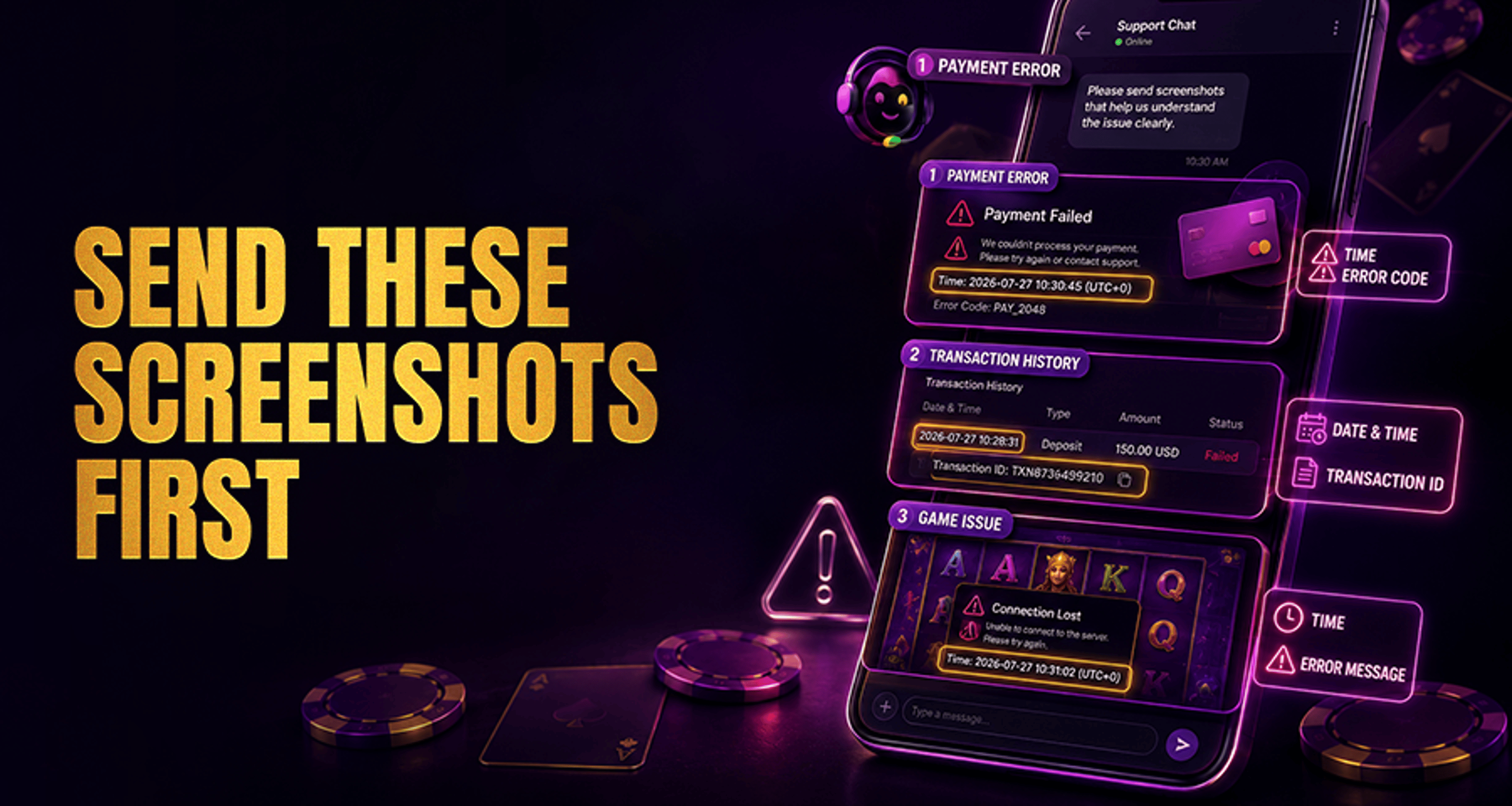
Start with the most useful evidence first. In most cases, casino support needs a combination of the exact error and the surrounding page context.
Priority order for screenshots
The error message itself
Capture the exact warning, failed action notice, rejected transaction message, or game error popup.
The full screen or full page where the issue happened
Include the surrounding page so support can see what action you were taking, which section of the site or app you were using, and the visible account or game state.
Transaction or payment reference details
If the issue involves money, attach the page showing the deposit ID, withdrawal reference, payment status, or wallet transaction record.
Game round details when relevant
For gameplay issues, include the game name, round ID, bet amount, result, and any missing balance or win information shown on screen.
Bonus or promotion terms when relevant
If the issue involves a reward, attach the bonus page, promotion terms, wagering progress, or the offer details shown in your account.
Account or profile details when support requests them
This may include your username, registered email handle, player ID, or verification status page.
Visible date, time, and device context
When possible, include screenshots where the date, time, browser, app version, or device status is visible.
A good support request usually includes both the specific problem and the context around it. A cropped error box alone may not show what triggered it.
What to capture for deposit, withdrawal, and payment problems
Payment issues need evidence that connects your account action to the transaction status.
For deposit problems
Attach screenshots of:
the failed deposit message
the full cashier or payment page
the selected payment method
the transaction reference or attempt ID if shown
any bank, wallet, or payment provider confirmation page if relevant
the visible date and time
If the deposit was deducted from your payment account but not credited to your casino balance, attach both sides of the issue: the payment confirmation and the casino balance or cashier page showing the missing credit.
For withdrawal delays or failed cashouts
Attach screenshots of:
the withdrawal request status page
the withdrawal amount and request time
the transaction ID or reference number
any pending, reversed, or rejected status message
any email or in-account notice related to the withdrawal
If your issue turns into a longer dispute, it helps to keep a consistent record similar to the evidence used in casino complaint and support escalation cases.
For other payment-related issues
If the problem involves fees, duplicate charges, or a missing payment method, capture:
the relevant cashier screen
the payment method list or error
the amount involved
the before-and-after account balance if visible
What to screenshot for bonus, promotion, or wagering disputes
Bonus issues are easier to review when support can compare the offer terms to what happened in your account.
Attach screenshots of:
the promotion or bonus offer page
the full terms visible in your account if available
the opt-in, claim, or activation screen
wagering progress or contribution details
any message saying the bonus expired, was removed, or could not be used
the game or bet screen if the dispute is tied to eligible play
This is especially important when the disagreement is about whether a game counted toward wagering, whether a promo code worked, or whether a bonus was removed after use.
What to attach for game errors, crashes, or missing wins
For technical or gameplay issues, support needs enough detail to identify the exact round and system state.
Attach screenshots of:
the game error message or frozen screen
the full game window with the game title visible
the round ID or game history if available
the stake, result, or missing payout details
your balance before or after the issue if relevant
any reconnect, loading, or crash message
If possible, send multiple screenshots in sequence so support can follow what happened before, during, and after the error.
What account and device details should appear in your screenshots?
For login, access, verification, or account-related issues, include only the details that help support locate the problem.
Useful details may include:
your username or player ID
your registered email address, if partially visible and relevant
the verification or account status page
the login error message
the date and time of the failed attempt
the browser, operating system, or app version when relevant
For account verification issues, support may ask for specific documents separately. Do not guess what is required. Send only the screenshots that show the status page, rejection notice, or upload error unless they specifically request more.
What sensitive information should you hide before sending screenshots?
You should protect information that support does not need to resolve the issue.
Unless specifically requested through an official support process, do not send screenshots showing:
full card numbers
CVV codes
passwords
seed phrases
full banking credentials
full government ID numbers when not required for the specific step
unrelated personal data from other apps, tabs, emails, or accounts
If a screenshot includes necessary account evidence plus extra sensitive information, mask the unnecessary parts before sending. Keep the important details visible, such as:
transaction ID
amount
date and time
account handle or username
status message
How to organize screenshots so support can review them quickly
Good organization makes your evidence easier to follow.
Screenshot quality checklist
use readable resolution
do not crop out key details
attach multiple images if one image cannot show both the error and the full context
keep the images in the order the issue happened
use simple file names such as
01-login-error.png,02-full-page-context.png, or03-withdrawal-status.png
Add a short written summary with the screenshots
Always pair your images with a short message that explains:
what happened
when it happened
which game, payment, or account action was involved
what troubleshooting you already tried
For example, you might say: "I tried to withdraw 200 USD on 14 May at 19:40, received a pending status, and the request later disappeared from my history. I already refreshed the app, logged out, and checked my email, but I did not receive a confirmation."
That short summary helps support use your screenshots more effectively.
FAQ
Should I include the full screen or just the error message?
Include both if possible. The error message shows the exact problem, while the full screen shows what action triggered it and what page you were on.
Do I need to attach a screenshot of my transaction ID?
Yes, if your issue involves a deposit, withdrawal, or payment status problem and the transaction ID or reference is visible.
What if I forgot to take a screenshot when the issue happened?
Send the pages you can still access, such as transaction history, account notices, game history, or status screens. Then explain in writing what happened and when.
Should I blur my personal or payment details before sending images?
Yes, blur unnecessary sensitive details. Leave relevant information visible, such as the transaction reference, amount, status, and date.
How many screenshots should I send in one casino support request?
Send the fewest screenshots needed to clearly show the issue. In many cases, 2 to 5 well-chosen images are more useful than a large unsorted batch.
Can screenshots help with bonus or wagering disputes?
Yes, they can help document the offer, the terms shown in your account, and your wagering progress or game activity.
Final tip
The best casino support request includes a concise written summary and only the screenshots that match your issue type. Focus on the error, the full page context, the transaction or round details, and the visible timing of the event. Share enough to identify the problem, but protect sensitive information that support does not need.





